What Is Two Factor vs Two Step Verification: A Complete Guide
Introduction
You set up a security code on your email. A few weeks later, your bank asks for a fingerprint and a password. Are these the same protective measures? Absolutely not. The question of what is two factor vs two step trips up even seasoned tech users. One method relies on completely different categories of identification. The other asks for two items that could come from the same category. The gap between them defines whether an attacker walks right in or hits a dead end. Recognizing that gap protects your money and your data.
The Core Problem: Why Mixing These Up Destroys Your Security
People toss the terms around as if they mean the same thing. Marketers muddy the water further by slapping the label “two-factor” on anything that asks for a password and a code. This confusion leads to a false sense of safety. You might believe you have military-grade protection when you only have a slightly taller fence. Understanding what is two factor vs two step gives you the power to audit your own accounts. You can spot weak setups immediately. You stop relying on methods that a SIM-swap attack shatters in minutes. Precision here prevents breaches.
What Is Two-Factor Authentication? The Unbreakable Rule of Different Categories
Two-factor authentication, or 2FA, pulls from two distinct authentication factor categories. The system will not grant access until you provide proof from two different buckets. The three widely recognized buckets are:
- Knowledge (something you know): A password, a PIN, or an answer to a secret question.
- Possession (something you have): A physical hardware key, a smartphone with an authenticator app, or a smart card.
- Inherence (something you are): A fingerprint, retina scan, or voice pattern.
True 2FA happens when a website demands a password (knowledge) and a YubiKey (possession). It also happens when an app scans your face (inherence) after you enter a PIN (knowledge). The critical requirement is the cross-category check. If a thief steals your password database, they still lack your physical thumb or your hardware key. That separation creates a massive obstacle.
What Is Two-Step Verification? The Single-Factor Trap
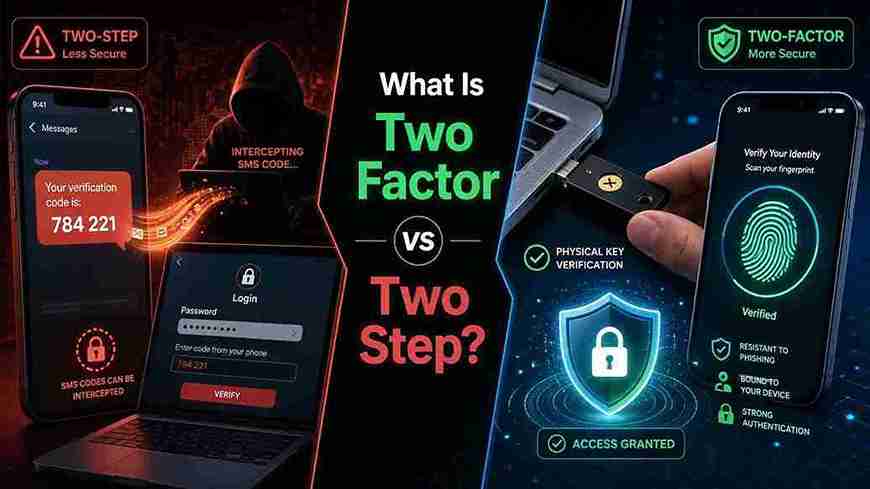
Two-step verification, or 2SV, requires two sequential actions to log in. Crucially, both actions can belong to the exact same factor category. The most common culprit? The password plus a one-time code sent via SMS or email. A password is knowledge. An email password is also knowledge. The SMS code sitting in your text messages? It’s digital, but the service treats it as a second knowledge check because you prove you can access a message, not that you physically hold the SIM card. Most systems cannot verify physical possession of the SIM; they just verify you can read the number on screen. This means you have only proven you know two secrets, not that you hold a physical object. This setup remains a single factor (knowledge) done twice. When you ask what is two factor vs two step, the answer hinges entirely on this distinction in categories.
Side-by-Side Comparison: A Clear Visual Guide
The differences become crystal clear when you lay them out. This table highlights the core mechanics, security levels, and real-world attack resistance.
| Feature | Two-Factor Authentication (2FA) | Two-Step Verification (2SV) |
|---|---|---|
| Factor Categories | Requires two different types (e.g., knowledge + possession). | Can use the same type twice (e.g., knowledge + knowledge). |
| Technical Logic | Authenticates identity via distinct proofs of who you are. | Verifies access via sequential gates, often both digital. |
| Resistance to Phishing | High, especially with FIDO2 keys. Credentials cannot be reused. | Low. Attackers trick users into entering both codes on a fake site. |
| SIM Swap Defense | Full protection if using an app or hardware key. | Zero protection. Attackers receive the SMS code immediately. |
| Common Tool | YubiKey, Google Titan Key, biometric + PIN. | Password + SMS code, password + email magic link. |
| User Experience | Fast tap or biometric scan; minimal typing. | Requires reading and typing a time-limited code. |
Why SMS Codes Fail the Two-Factor Test Completely
SMS-based verification dominates banking and social media. It screams convenience but whispers security. Network architects designed SS7, the backbone protocol for SMS, decades ago without modern threat models in mind. Attackers exploit SS7 flaws to intercept texts without touching your phone. SIM swapping bypasses the need for technical exploits entirely; a smooth-talking criminal convinces your carrier to port your number. Once they have the number, your “second step” becomes their main entry key. This single point of failure reveals why security professionals react strongly when you ask what is two factor vs two step and point to a text message. Texts prove you can receive a code, not that you hold a distinct physical token.
Hard Tokens and Passkeys: The Gold Standard of Real 2FA
Hardware security keys like YubiKey or the Google Titan Key implement the FIDO2 standard. They create a physical possession factor that browser-based phishing pages cannot steal. The key verifies the domain origin before releasing credentials. A fake “Googgle.com” login page gets zero data from the key. Passkeys build on this principle by binding a private key to your device’s secure enclave. You unlock that key with a biometric scan. This combines inherence (fingerprint) with possession (the private key stored locally). Both approaches deliver genuine what is two factor vs two step clarity through physical, cryptographic proof rather than human-readable codes.
Why E-E-A-T Matters When Writing About Digital Security
Google’s algorithms prioritize content that demonstrates real-world experience and clear expertise. A security guide written by someone who has never configured a FIDO2 server lacks credibility. Practical testing of hardware keys under simulated phishing attacks provides the depth generic research cannot match. Citing primary sources from identity standards bodies strengthens trust. The NIST Special Publication 800-63B clearly defines authenticator types and explicitly deprecates SMS as an out-of-band verification method due to its vulnerability profile. The FIDO Alliance publishes technical specifications that explain why asymmetric cryptography stops phishing dead. These primary sources anchor the discussion in authority rather than opinion. Content that explains what is two factor vs two step without referencing these standards misses the “T” in E-E-A-T completely.
How to Audit Your Accounts Right Now for Weak Verification
Open a browser tab right now and follow this checklist. Look under the security settings for each of your critical accounts. Ask these three sharp questions for each one.
- Check the naming: Does the setting say “two-step” or “two-factor”? If it proudly says SMS backup, you have an instant weakness.
- Look for hardware key support: Search the settings page for “security key,” “FIDO2,” or “passkey.” Activate this immediately if available.
- Remove fallback options: Attackers attack the weakest link. If you enable a YubiKey but keep SMS recovery active, your security posture equals SMS-level. Disable low-grade recovery methods.
Performing this audit moves you from theoretical knowledge to practical defense. You start applying the definition of what is two factor vs two step directly to your identity safety.
The Architectural Shift: Passkeys Eliminate the Confusion
Apple, Google, and Microsoft jointly expanded passkey support in their operating systems. A passkey syncs across devices via an encrypted cloud account. It requires a biometric check to unlock the local private key. This workflow mixes two factors so seamlessly that users no longer think about steps. The technology eliminates shared secrets completely. No password database exists on the server to steal. This paradigm leap makes the old debate nearly obsolete for modern services. You no longer ask what is two factor vs two step because the architecture collapses strong authentication into a single, phishing-resistant gesture.
Building Your Personal Security Policy: A Three-Tier System
Protection needs vary across accounts. A streaming service login does not need the same armor as your primary email. Your email account holds the keys to password resets for everything else. Apply a tiered security model.
Tier 1: High Risk (Email, Banking, Domain Registrar)
- FIDO2 hardware key (primary).
- Passkey synced to phone (backup).
- No SMS fallback. Remove phone number from account if possible.
Tier 2: Medium Risk (Social Media, Cloud Storage)
- Authenticator app generating TOTP codes (possession factor).
- Strong, unique password stored in a password manager.
- Recovery codes printed and stored in a physical safe.
Tier 3: Low Risk (Forums, News Sites)
- Single strong password via password manager.
- Passkey if offered as a one-click convenience.
This structured approach applies the strict rules of what is two factor vs two step without overcomplicating low-stakes areas.
The Psychology of Deception: Why Attackers Exploit the Definition Gap
Criminals thrive on blurred lines. They send a phishing email mimicking a bank login. They collect your password on their fake page. Their system instantly forwards your credentials to the real bank. When the real bank sends an SMS code, you type it into the fake page under pressure. The attacker relays it to the bank. Within seconds, they transfer funds. They succeeded because the bank deployed 2SV and called it 2FA. You trusted a process that lacked physical possession verification. NIST’s Digital Identity Guidelines explicitly detail why out-of-band verification using public networks fails against determined phishing and relay attacks. Precision in terminology would have raised immediate red flags during your security setup.
The Future Landscape: What the Industry Must Change
Regulatory bodies and large platform holders are slowly forcing correct terminology. Google’s Advanced Protection Program bans SMS entirely. It mandates two physical security keys, a true multi-factor possession strategy. Consumer protection agencies scrutinize banks that market SMS codes as “secure two-factor.” The push for passkeys eliminates the name game entirely by baking the factors into the operating system. As a user, you must demand hardware-backed tokens from services that hold your sensitive data. The clarification around what is two factor vs two step represents more than a vocabulary lesson; it drives product decisions that impact millions.
[Strong Conclusion]
You now hold a specific, actionable filter for evaluating every login screen. When a service asks for a password and a texted code, label it mentally as a two-step request with a single point of failure. When it demands a physical key or a biometric unlock tied to a local device, you stand behind real two-factor assurance. Take ten minutes today. Open your email security dashboard. Disable SMS recovery. Register a hardware key or a passkey. Lock the door your attackers hope you leave open.
[Frequently Asked Questions]
1. Can a text message code ever be part of true two-factor authentication?
Technically, a carrier network could engineer true possession verification at the SIM level, but standard SMS delivery treats the code as a bearer token accessible to anyone who can read the screen. It proves receipt, not possession of a unique physical device. In practice, treat it as a weak single factor.
2. What happens to my accounts if I lose my hardware security key?
You must maintain a spare key registered to the same account and store it in a safe location. Print backup recovery codes and treat them like cash. Accounts with no spare key and no recovery codes become permanently locked, which service providers rarely bypass.
3. How do passkeys change the definition of two-factor authentication?
A passkey combines a possession factor (the private key sealed in your device’s secure element) with an inherence factor (your fingerprint or face scan to unlock it). The two factors occur locally in a single user gesture, collapsing the steps without weakening the multi-factor security model.
4. Why do major platforms still push SMS verification if it remains weak?
Mass adoption requires low friction. SMS works on every phone without installing apps or buying hardware. Platforms balance risk against abandonment rates; a user who enables SMS protection offers far better security than one who uses only a password. They accept the vulnerability to raise baseline security globally.
5. How do I check if a login process uses 2FA or just 2SV without technical knowledge?
Ask yourself: “Do I need a physical object or a body part, or am I just typing in two different codes?” If you grab a key or scan a finger, you have 2FA. If you open an app or a text message to get a number you type in, you likely have 2SV.
6. Which primary security standard officially discourages treating SMS as a valid second factor?
The U.S. National Institute of Standards and Technology (NIST) Special Publication 800-63B explicitly states that out-of-band verification using SMS is deprecated. The publication cites risks including SIM swap, SS7 intercept, and device theft that cannot meet high-assurance requirements.
External Sources (Primary Authority)
- NIST SP 800-63B Digital Identity Guidelines — Defines authenticator types and formally deprecates SMS for out-of-band verification.
- FIDO Alliance Technical Specifications — Details how asymmetric cryptography eliminates shared secrets and blocks phishing for true multi-factor possession.
- Google Security Blog (Advanced Protection Program) — Documents the mandatory physical key requirement and the complete removal of SMS as a fallback.